
Trending now
Burning Bridges AI trend, starring you
One photo puts you in the middle of a chandelier party: the cup, the point at the guests, the hand over the eyes and the wave. 15 seconds, vertical, ready to post.
- One photo, 15 s clip
- 7 credits at 480p, 12 at 720p
- Original beat, not the song
What Burning Bridges AI makes
Do the Burning Bridges AI trend from one photo: you in a chandelier party, silver cup, hand over the eyes. 15 s vertical MP4, original beat, no watermark.
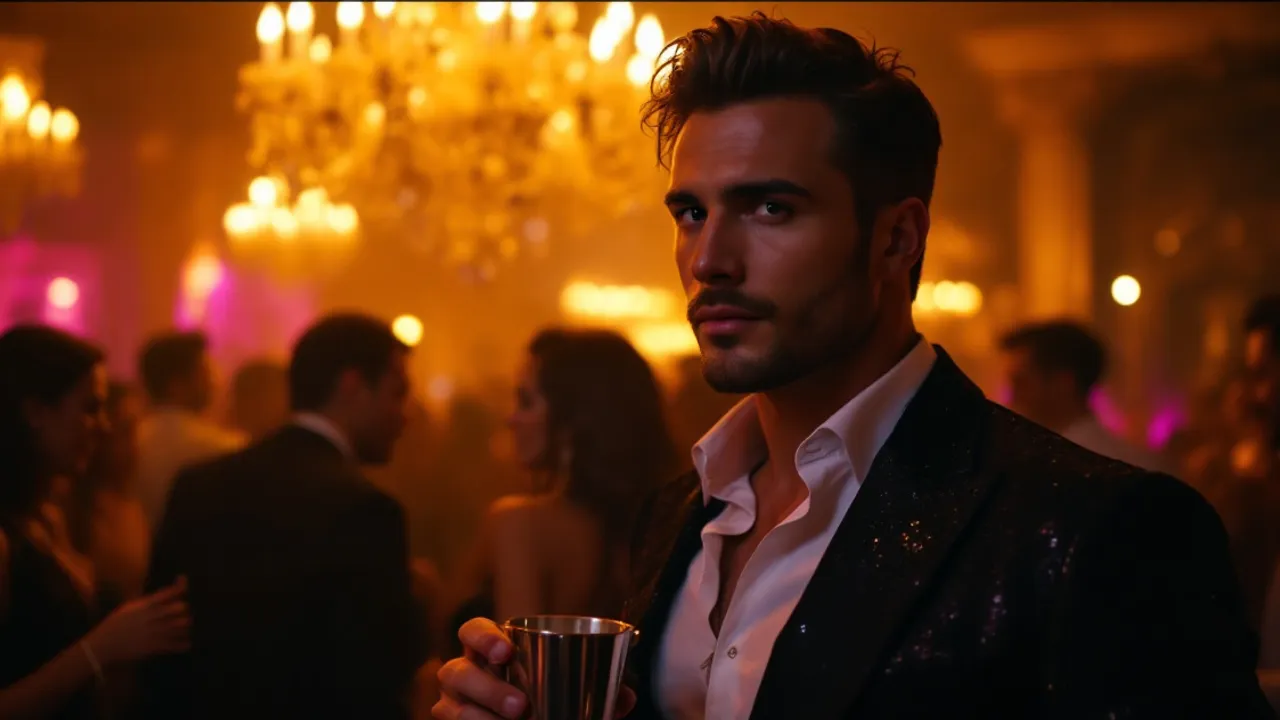
Concept image made with AI to show the idea; not a customer video.
The short answer
What the Burning Bridges trend is
Updated October 24, 2026
The Burning Bridges AI trend is a short clip where you play the person in the middle of a lavish chandelier party, holding a silver cup, pointing at the guests and shading your eyes as if looking for someone. On RapVideo you upload one clear photo and the AI renders a new 15-second vertical video of you doing those moves in a similar-looking party room. It costs 7 credits at 480p or 12 at 720p and downloads as an MP4 with no watermark.
The Burning Bridges trend grew out of a scene in a music video: a party room with chandeliers, a man in the middle holding a silver cup, pointing at the crowd, covering his eyes with one hand and waving. People started recreating the walk, the look and the gestures, and then redoing it with AI so that anyone, or any character, could stand in the middle of the room.
Our version is not a copy of that footage. The model renders a new party scene around your photo, with your own face and outfit, and follows the same kind of moves and handheld camera. The track underneath is an original beat generated for the clip. We do not use the original song, so if you want it, pick it in the sound picker of TikTok or Instagram when you post.
It is one person per clip. If you and a friend both want in, make one video each and post them side by side. RapVideo is independent and is not affiliated with the artist, the label or any app named on this page.
Set up here: Grok Imagine Video 1.5 Lite (xAI), 480p, 15 seconds, 7 credits. Read the full guide
How it works
Make it in 3 steps
- 1
Add one photo of you
A front-facing photo with your face and upper body visible. One person per photo; the clip is built around a single figure.
- 2
Press create
There is no prompt to write: the party room, the camera and the moves are built into the effect. Check the credits on the button.
- 3
Download and add the sound
Rendering usually takes a few minutes. Save the MP4, then add the trending song inside TikTok or Instagram when you post.
Why make it here
What you get in the clip
A party room of its own
Crystal chandeliers, beige curtains and long tables with white cloths, rendered around you.
The signature moves
The raised cup, the point at the guests, the hand over the eyes and the wave.
Your face and outfit
Both come from your photo. This is not a face swap onto someone else's body.
15 seconds, vertical
A 9:16 MP4 sized for TikTok, Reels and Shorts, with no watermark.
Ideas
Who can stand in the middle of the room
- You, looking for the friend who always runs late
- Your dog, if you have a photo with a clear face
- A coworker for the office party video
- A cartoon-style character from your own artwork
- Your best friend, with their permission, for their birthday
Ask before you put anyone in a video, and leave public figures out of it.
Watch
Burning Bridges AI videos on YouTube
Videos by creators and other tools, each credited and linked to the original on YouTube. Nothing loads from YouTube until you press play.
Drake Fans Use on AI to Take on the "Burning Bridges" Challenge!
THE SHADE ROOM on YouTubeBurning Bridges
Drake - Topic on YouTubeGuides
Read next
Related tools
Your turn
Step into the party
Add one photo and press create. Your Burning Bridges clip is a few minutes away.